Pour Over
A downloadable tool
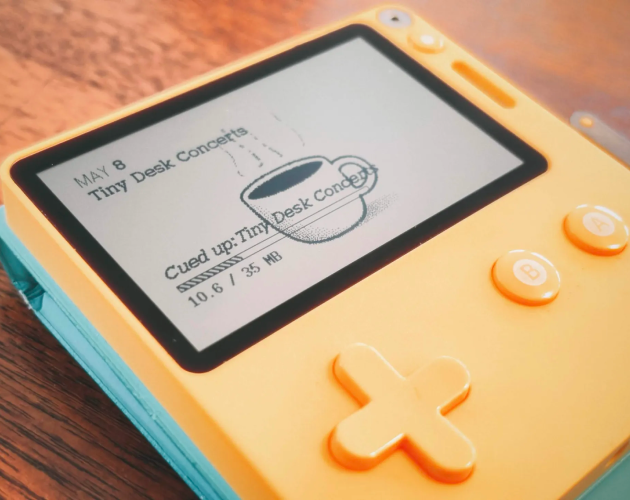
Pour Over is a podcast player for the Playdate, tuned for the kind of public radio you'd put on while you're doing something else. Three modes:
- Default - news at the top of the hour, a Tiny Desk concert in between. News refreshes :10 past, every hour.
- Music Only - music podcasts on loop, no news.
- Your Stack - pick from a catalog of 26 NPR shows (Hidden Brain, Planet Money, Wait Wait, Code Switch, Fresh Air, and more). Optional news interleave.
While one track plays, the next one downloads quietly in the background, so the handover at the end is seamless. Show artwork is fetched from each podcast's RSS feed and dithered for the 1-bit screen, every show on its own little coffee mug.
Designed for slow listening. No queues, no shuffles, just listen.
Controls
Ⓐ play / pause
↑↓ volume
←/→ skip
System menu: switch mode or configure your stack.
Requirements
A Playdate connected to WiFi (System Settings → WiFi).
All audio streams from each show's public RSS feed.
Pour Over is an independent third-party client. NPR's name and shows are referenced only to identify the public RSS feeds the app subscribes to. All show artwork and audio belongs to the respective publishers.
Credit to David Hepworth for the cover image on this itch page.
Download
Install instructions
You'll need:
- A Playdate connected to WiFi (System Settings → WiFi)
- A Panic web account (play.date — free)
1. Download PourOver.pdx.zip from the Downloads section above.
2. Open the Playdate sideload page in your browser: play.date/account/sideload
Sign in with the same Panic account that's signed into your Playdate (Settings → Account on the device).
3. Upload PourOver.pdx.zip to the sideload page (drag-and-drop or use the file picker). The page accepts the zipped folder directly, don't unzip it first.
4. On your Playdate, open the launcher, scroll to the Sideload group, and you'll see Pour Over's card waiting. Open it once to install.
That's it! Pour Over now lives on your Playdate alongside your other games.
Comments
Log in with itch.io to leave a comment.
I absolutely love this. Thank you so much for creating this. I can see myself using this really a lot.
From what I have seen the app never gets over 50mb (after my very limited testing), which is really great. I expected a lot more when I first read the description.
If I could add three things it would propably be these:
- A sleep timer function or something like that. So that the device turns off after about 30 minutes.
- Another would be a way to customize frequency in the custom Stack. I think about every second play (for me) should be from the music category, but if I activate everything, the chance for any music is very low. Other people might want another specific podcast more often, which is why I think a general frequency feature would be awesome. But I wouldn't know how to do that easily, so the increased music frequency is propably what mot people would find most useful.
- Using the crank to skip 10 (or so) seconds forward or (more importantly) backward. When listening to a podcast but being distracted for a second, a rewind feature would be great.
- (And of course custom podcasts, but I don't know how feasable this would be. And also it kind of is the charm of the app a little bit that you don't know whats next. Like listening to you own custom radio station.)
I also think I might have found a bug, if skipping a few podcasts of your own stack it just showed that it is loading, but it never reaches the download step and just skips to the next podcast. On this next podcast this repeats again. This was then seemingly infinitely continuing until I restarted the app.
Thank you so much again for bringing this kind of nostalgia trip (with modern content) to our desks.